

Drowning in tabs? How I use AI to triage everything I read
Ever since I started working at 19, I’ve been kinda obsessed with ways of working. Back then I wouldn’t call it that, I called it being a bit of a control freak, but the reality is that I’ve always found it fascinating how people consume information and make stuff with information.
What followed was a decade and a half trying everything under the Sun so that I could find the best workflow. Plot twist, there isn’t a best workflow, there’s only the workflow that works for you at a given point, and as you change your workflow might change too. This is the way.
The other reason I’m fascinated by this is because I’ve always found myself not having a lot of curation filters for what I read or consume. For the outsider, and even for me, sometimes it just feels random. I’ll watch a video about emergent properties followed by an interview with Anthony Starr followed by a piece on the future of OOH, and all of this just adds to the soup of Stuff That May Be Useful Later.
With AI, of course, this stuff now becomes even more interesting. Because all my dreams of systems speaking to systems to do stuff for me are more doable now. Especially for those of us who are info omnivores who consume anything and everything that tickles the brain. So I wanted to share a little workflow that’s working for me now.
The image below is how I now find myself consuming a lot of stuff now, not because I want to get deep on any particular topic, but because I want to find lots of topics about which I get the general gist of things.
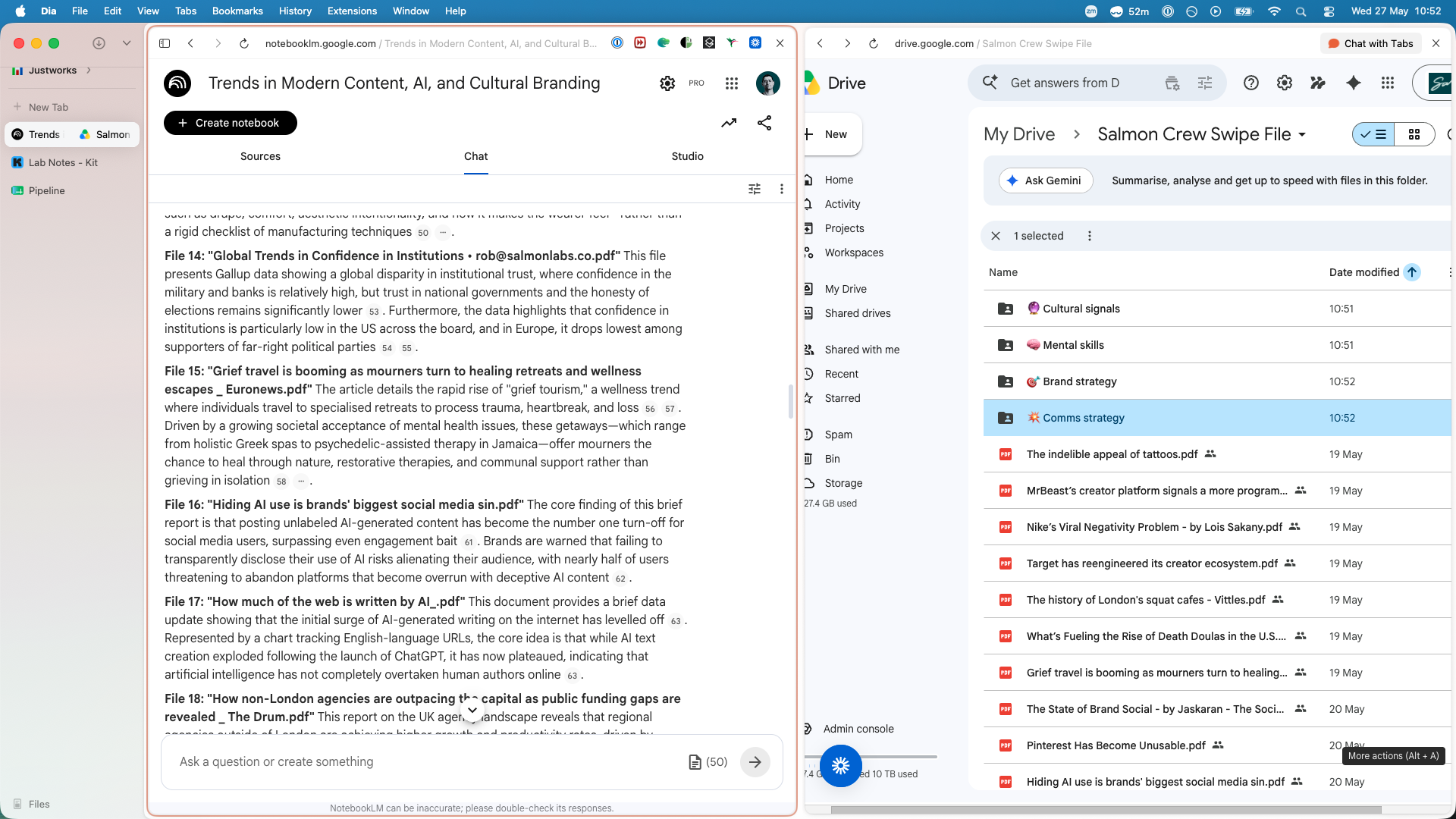
To get to this end state, the process is relatively straightforward and there’s little to no coding required, because I can’t be arsed to maintain code when simple legacy tech with a couple AI tools will suffice. So yes you might have the perfect Obsidian + Claude Code workflow that does just this, but for me simple systems are much easier to maintain.
So, it goes a little something like this:
I consume most of my information via newsletters. Not all of it, YouTube and podcasts are the next big hitters, but it’s mostly email.
When I open my inbox, I go through everything and broadly open stuff that peaks my brain in a new tab. I do not read it. I just do the initial triaging so I end up with something like 30 tabs to read.
I take each of those tabs and save them as PDFs like a boomer. Yes, I PDF web pages to read them. But don’t worry, there’s a (probably credible) reason why. Which leads to step number four…
I add the saved PDFs to my swipe file (which you can access too). Now I have a triaged list of stuff that may be interesting, but I don’t know yet because I’ve not read it yet. And when you do 30 PDFs a day, chances are you might spend the whole day reading. And all the other stuff you wanted to do, including client work, goes to shit.
So… I don’t do that. Instead, I go to NotebookLM and ask it to access my swipe file, load up the last 50 sources (that’s the limit) and ask it to give me the gist of the idea in each of those files.
I put NotebookLM side by side with my swipe file, and if I feel the idea on a particular PDF is novel or useful I add it to the respective folder. If I don’t, or it’s saying more of the same, I delete the PDF.
And that’s basically it! Rinse and repeat every time I want to get updated on what the hell is going on in the world. It’s a bit labour intensive at first, but once you get the gist of it you probably save 2-3 hours of reading so you can focus on pattern matching instead.
Now, there are of course limitations with this process. I don’t spend enough time with individual items, so you might argue that I lose depth. But my counter-argument is that unless I am working on something specifically for a client, I don’t want depth. I want the gist of a whole range of ideas which I can then let marinate in my brain.
And of course, if the job is more about depth, now I have a highly curated search engine inside my Google Drive of stuff that I found interesting in the past, and it’s a tremendous shortcut to kickstart a research process and start trying to work out what are the right questions to ask. It helps me frame client work much more effectively.
I wanted to write about this because:
Last time I wrote about how I do stuff, people liked it
It’s the result of loads of trial and error with tools to find a system that keeps my media diet varied and sane, so it may help you too
Or maybe I’m just a huge dork about media and information and cognition and none of this matters to more than two people, but then again as we’re collectively negotiating what good information and trust systems look like when there’s far more stuff in the world than we will ever be able to consume, my bet is you’re thinking about it too.
So that’s it, that’s the system. So far I’ve not gone crazy with it, and I feel much more informed and less FOMO-y about the state of things. I hope it helps you too, or at least helps you think about what the kind of systems you can create and maintain to feel far less FOMO-y too.
If you’d like to access my swipe file and get into what I’m really into, you can also do that. It’s one of the perks of being in the Salmon Crew. Plus you’ll get invited to our private Slack, exclusive events, and more. 300+ other strategists from 17 countries are in. Hope to see you there.
Written by Rob Estreitinho, a comms and social strategy consultant and the founder of Salmon Labs. You might also enjoy getting my newsletter. 6,000 readers at a 60% open rate, read by agency and in-house strategy leaders from all five continents. Subscribe below.